HivemindOS manual
How HivemindOS works
HivemindOS runs on computers you own. This page explains its parts, how they connect, and where the trust boundaries are.
You don’t need it for everyday Chat, Work, Brain, or Fleet use. Read it when you self-host, review security, or diagnose an unusual setup.
The parts
| Part | What it is |
|---|---|
| The app | The dashboard (desktop app or browser) and its local API. It runs on your main computer, the hub. |
| Your machines | Each computer in your hive runs a small collector service that reports health, agents, and apps. |
| The private network | Hivemind Link or your own Tailscale connects your machines. Nothing needs a public port. |
| The shared brain | A normal Obsidian vault folder that every permitted agent reads and writes. |
| Agent runtimes | Hermes, OpenClaw, Aeon, and local OpenAI-compatible servers, reached through one common adapter layer. |
| Managed services | Optional HivemindOS-hosted services for official balances, settlement, pricing, hosted compute, and managed cloud agents. |
How they connect
flowchart TD
  App["HivemindOS app (desktop or browser)"] --> Api["Local API"]
  Api --> Home["App data folder"]
  Api --> Vault["Shared brain vault"]
  Api --> Collector["Collector on this machine"]
  Api --> Link["Hivemind Link or Tailscale"]
  Link --> Remote["Collectors on your other machines"]
  Collector --> Runtimes["Agent runtimes and local apps"]
  Remote --> RemoteRuntimes["Agent runtimes and local apps"]
  Api -.-> Managed["Managed services (optional)"]
The app. The dashboard only talks to its own local API. That API reads local files, calls agent runtimes through the adapter layer, or forwards requests to a collector. The desktop app and the browser share the same interface. The desktop app adds a few native actions, such as browsing and creating local folders, and falls back to the API when the target is another machine.
Collectors. A collector is a small service on each machine, on port 8787 by default. It reports machine health, agents, and apps. It also runs actions you start on purpose, such as an update or a shared-env change. See Fleet telemetry and Hivemind Link.
The private network. Hivemind Link is the default. It joins your own Tailscale account from inside the app and keeps the collector bound to localhost. Install the full system Tailscale client only if you need Tailscale SSH, rsync repair, or HivemindOS-managed Syncthing. Without Tailscale, HivemindOS still runs as a local dashboard with a local vault.
The shared brain. The vault is a normal markdown folder, usually ~/Documents/Obsidian/hivemindos-vault. Obsidian is the editor, not the transport. You pick one sync owner to move the files between machines. See Hivemind Sync and Tailscale and Hive Superbrain.
Agent runtimes. Adapters let the dashboard ask any runtime for status, skills, schedules, runs, outputs, sessions, and model options in the same way.
| Runtime | Kind | Current capabilities |
|---|---|---|
| OpenClaw | Gateway | status, chat, model selection |
| Hermes | Interactive | status, chat, runs, memory, session search, background tasks, X search, video generation, Codex runtime, Kanban decomposition, setup, wallet tools, model selection |
| Aeon | Background | status, skills, schedules, runs, outputs, memory, background tasks, notifications, setup |
| HivemindOS | Interactive | status, chat, model selection |
Managed services. Some things can’t safely be decided by an app on your own computer: official balances, settlement, pricing, hosted compute, and managed-agent accounts. HivemindOS-controlled infrastructure enforces those. The official Honey ledger stores privacy-safe metadata only. It never receives prompts, responses, local paths, machine names, Tailnet IPs, or wallet secrets.
Where your data lives
- App data folder (
~/.hivemindos): dashboard settings, shared env values, the encrypted wallet vault, local fallbacks, and caches. - Shared brain vault: notes, the work board, schedules, notifications, shared skills, and machine aliases.
- Runtime homes: each runtime keeps its own config and sessions in its usual folder.
- Managed services: only what they need, such as the optional official Honey ledger and hosted compute accounting.
For exact paths, see API and storage reference.
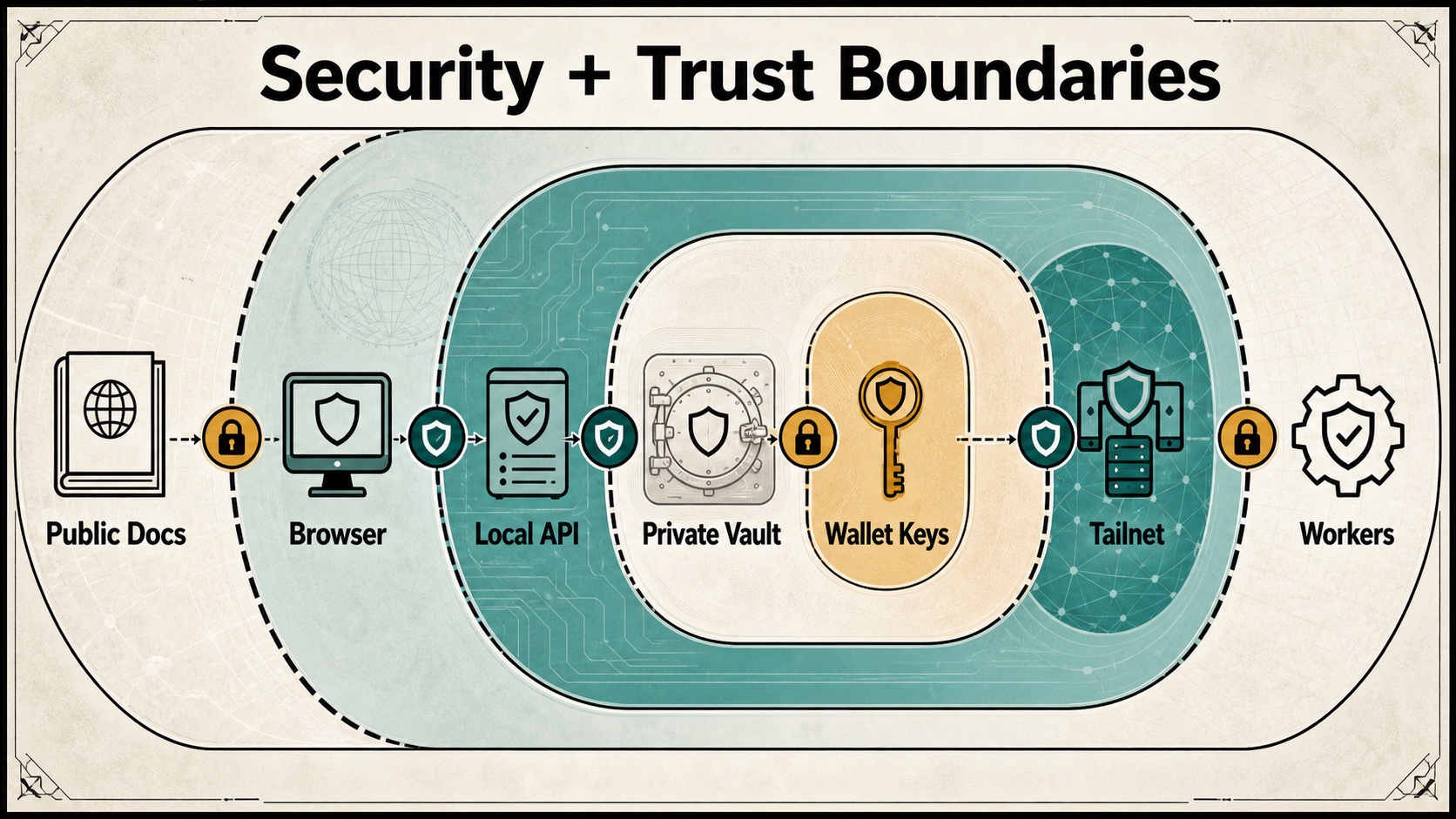
Trust boundaries
- Public: these docs contain no secrets.
- Local: the app, its API, and native actions run on your computer.
- Private: the vault and wallet keys stay on your machines. Secret values live in shared env, never in vault notes.
- Private network: collectors are reachable only over Hivemind Link or your Tailnet. Don’t expose them publicly. Fleet is read-only by default. Remote updates, env movement, and vault repair are explicit actions, and vault repair writes conflict copies instead of overwriting.
- External: managed services enforce official balances, quotas, and pricing. Local settings can’t change them.
Go deeper
API and storage
Route groups, collector endpoints, hosted-service routes, and where state is saved on disk.
Open the referenceHivemind Sync and Tailscale
How the shared brain moves between machines and what Tailscale is used for.
Open the sync guideFleet telemetry and Hivemind Link
Install collectors, set up collector-only machines, and lock down access.
Open the fleet guideGenerated media signing
How generated images and videos reach your phone privately.
Open the media guideDiagrams and maps
Visual maps of the fleet, brain, work, wallets, and security boundaries.
Open the diagrams