HivemindOS manual
Work And Automations
The Work board is for requests you want to track beyond one chat: assign an owner, attach files, follow progress, answer blockers, review evidence, and keep the results. Automations runs work later or on a repeating schedule. For a quick question that needs none of that, use Chat.
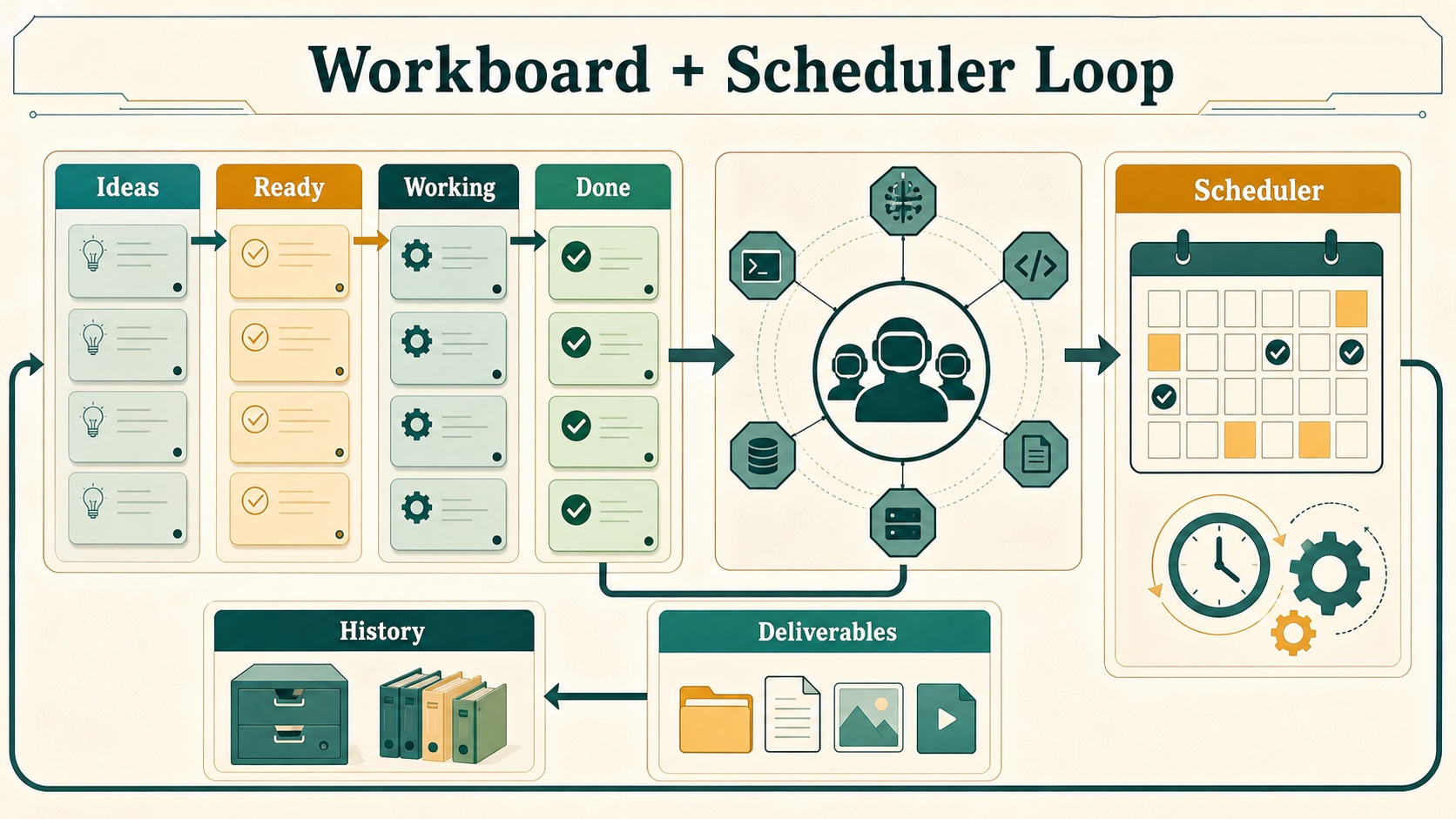
Run a task on the Work board
- Open Work and add the request to a board.
- Add what the agent needs: files, a project folder, a target machine, context, or success criteria.
- Move it to Waiting to start, or assign it to an agent.
- Follow it in Working. Add a comment or attachment to steer it.
- Answer decisions in Needs You.
- Review the result, evidence, and deliverables before you accept it as Done.
| Column | Purpose |
|---|---|
| Ideas | Rough thoughts that shouldn’t run yet |
| Waiting to start | Ready to assign |
| Working | Picked up and in progress |
| Needs You | Blocked on access, approval, or a decision |
| Done | Finished, with notes, evidence, results, or deliverables |
| Archived | Hidden from the board but kept |
Boards are stored in your shared vault, so your trusted machines see the same tasks. If the vault is briefly unavailable, a local copy keeps the board working.
You can also:
- Create and switch between named boards, and filter by assignee, text, or archived state.
- Move or assign several cards at once.
- Spot work that has stalled.
- Add quick tasks with text, files, images, folders, a target machine, or voice.
- Open deliverables straight from a task. Finished child tasks roll their deliverables up into the parent.
- Import unchecked tasks from your notes.
Agents can use the same board through MCP tools. See Agent-native workflows. For measurable multi-agent sprints, see Agent Challenges.
Require evidence before Done
A task can carry a loop contract: its goal, done criteria, budget, required evidence, and named checks (eval gates). Some checks run before work starts; others check the result. If a required check has no passing result, the task goes to Needs You instead of being marked done.
Choose the Engineering discipline template when adding a consequential code task. It sets up a real closed loop: design approval when the request is ambiguous, baseline evidence, red/green test evidence (or a reason it doesn’t apply), focused tests, lint, types, independent review, and a final receipt. The attached engineering-discipline skill keeps the process proportionate. It never grants permission for destructive Git operations, external actions, or spawning more agents.
Built-in loop templates also cover code fixes, app builds, research, content, daily briefs, company learning, and Evo benchmarks. Optimizer loops can record experiments, compare scores, and remember what not to try again. See Loop Engineering for details and Agent Evaluations for how results are judged.
Queen Bee Swarm Goals
Type /swarm-goal <build request> in chat to turn a rough software idea into coordinated work. Queen Bee:
- Expands your request into a fuller build brief: what to build, likely framework, features, behavior, and visual direction, plus instructions to split the work across parallel agents.
- Records it as a Work board task and picks the best online agents for that kind of work.
- Attaches the app-build loop: planner, builder, and independent evaluator roles with lint, type, browser, artifact, evidence, and judge checks. The task can’t complete from a worker’s summary alone.
When Queen Bee breaks a PRD into tasks, each executable child gets a matching evidence loop: Engineering Discipline for code, operations, and QA; source evidence and review for research; and content review for writing. Queen Bee also creates a visual plan for each accepted task so you can see the route and risks at a glance.
Skills that improve themselves
When the same installed skill fails or gets blocked three times across three separate chats, tasks, or runs, HivemindOS proposes an improvement in Brain Review. Nothing changes until you approve and apply it. Applying creates a Work board task that tests four variants of the skill against the original with the same cases and review. It ends with a winning change or a no-improvement receipt, and never replaces the installed skill automatically.
A skill counts as used only if you named it, the agent is set to prefer it, or the agent actually loaded it. A thumbs-down on a chat reply records a failure for that turn.
Zero Human Company tasks
With the default HivemindOS crew engine, a company’s goal becomes Work board tasks. Every company task needs outcome evidence, and customer-facing work also needs review by a separate agent. Missing evidence or a missing reviewer sends the task to Needs You. The results build the company’s own reusable knowledge, independent of any single model.
With the optional AEON background skill engine, no Work board task is created. Company Runs records the handoff, and AEON keeps the detailed run and outputs. See Zero Human Companies and Using AEON With Zero Human Companies.
Note intake and Work History
- Note intake scans the vault folders you choose for unchecked tasks and “Next action” sections, and imports the ones you pick into Ideas. Turn it on and choose folders in board settings.
- Work History combines changelog and repository activity with project filters, search, and paging.
Link tasks to projects
A task can link to a registered Hivemind project, but it doesn’t have to. A linked GitLawb project adds public code provenance to the task. For code work, Queen Bee can prefer the machine that has a matching, up-to-date checkout of the project; each machine reports its checkouts in its version.projectCheckouts inventory.
Automations
- Open Automations and choose New automation.
- Describe what should happen and pick the responsible agent.
- Choose when it runs: a cron expression, an interval, daily, weekdays, or a market-hours style template.
- Review the saved schedule, then turn it on.
Schedules and their run history are stored in your shared vault, so they are visible on your trusted machines. You can run, pause, resume, and inspect schedules where the agent’s runtime supports it. Skill-based schedules keep their skill with each run. For example, the hive-quant-research skill can run on an approved cadence from a reviewed request file; it writes local research files and can’t turn on live trading.
AEON schedules show recent AEON results as deliverable cards you can open or download.