HivemindOS manual
Wallets And Spending Controls
Wallets let you and your agents pay for things without giving anyone unlimited access to your money. Open Wallets to create or import a wallet, check balances, set limits, freeze spending, back up your keys, and answer approval requests.
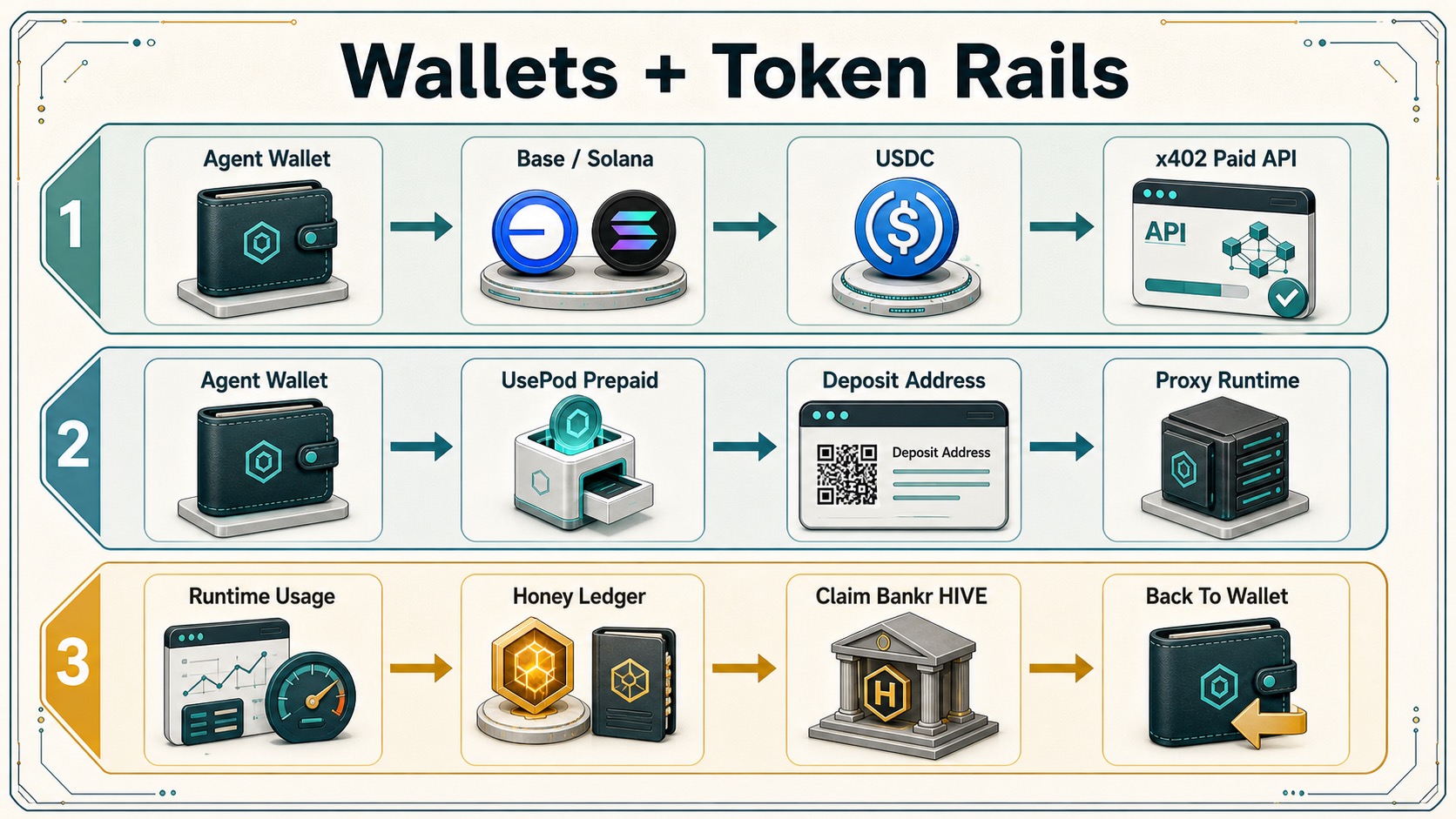
Your first wallet
A new installation prepares an empty wallet and links it to your assistant. Home’s daily brief shows Agent wallet, its balance, and Open wallet. If setup fails, use Try again in the same place.
Spending starts off. Creating or linking a wallet does not deposit money, turn on spending, or give an agent access to funds. An existing wallet keeps its current permissions.
New agents share that wallet by default. During agent setup, choose Choose a wallet to pick or create another one, Use shared wallet to go back to the default, or No wallet to leave the agent unlinked. Agents that share a wallet still have separate spending permissions.
HivemindOS services, such as HivemindOS Models or hosted media, are paid from your single HivemindOS account balance. Picking an agent wallet does not change which account pays for them.
What a wallet can hold
- Local wallets on Base, Robinhood Chain, and Solana. Each has a dollar stablecoin: USDC on Base and Solana, USDG on Robinhood Chain.
- Robinhood Chain wallets can also hold WETH and official Stock Token contracts, which is how tokenized stock trading works. See Stock Trading.
- A managed wallet (optional) adds Bitcoin and Sui transfers, wider EVM coverage, protected remote signing, and supported EVM yield. See Managed Wallet setup.
- Banking: use Set up ClawBank to connect a bank account and see its services. Creating a wallet does not issue a payment card, and this setup cannot create one.
- MoneyClaw keys can be saved per agent or shared across agents after the key is validated.
- UsePod agents show a prepaid rail with its deposit address, last balance, route, and test status.
Add funds
- Open Wallets and select the wallet.
- Use Receive to show its deposit address.
- Send the wallet’s stablecoin, plus a little of the network’s native token to pay gas.
Only fund what you plan to use. Funding a wallet does not turn on spending.
Spending permission and limits
Each wallet has its own rules. You set them once in Wallets, and they apply to every action, whether you start it or an agent does:
- Spend must be on before the wallet can pay for anything.
- Per-payment, daily, and monthly limits cap single actions and rolling totals.
- Approval threshold: anything above it pauses until you approve.
- Allow auto-use lets an agent wallet pay within its cap without asking each time.
- Freeze stops new spending.
Personal wallets never auto-spend. Every send, swap, or payment from your own wallet needs your confirmation, even when an agent prepares it. Company wallets follow their company budget and approval policy, and the company kill switch stops new spending.
Before any money moves, you always:
- Choose the exact wallet or connected account.
- Review the action, network, asset, amount, recipient, expected fee, and provider.
- Check that it fits the wallet’s per-payment, daily, and monthly limits.
- Complete any required approval.
- Check the receipt or new balance afterwards.
Preparing an action is not the same as running it. Every completed action is recorded in Wallets · Activity. For how limits apply to trading, see Safety & Limits.
Pay for services with x402
x402 lets a wallet pay a web service per request. HivemindOS pays inside the wallet’s policy instead of giving an agent open wallet access.
For one-click payments, the agent needs a local Base, Base Sepolia, Robinhood Chain, or Solana wallet with:
- Spend on and provider
x402; - enough accepted stablecoin plus native gas;
- Allow auto-use on, with a cap that covers the price.
Personal wallets still ask you to confirm each payment. Robinhood Chain x402 payments only work when the service accepts eip155:4663; otherwise HivemindOS reports that no matching payment option was available.
HivemindOS Models
Choose HivemindOS Models in the model picker to use managed models without your own provider API key. The selected agent’s wallet pays each call through x402, under the same Spend, cap, auto-use, and network rules as other paid requests. The models are hivemindos/auto, hivemindos/fast, hivemindos/frontier, and hivemindos/research.
Hosted model messages are metered: each successful message costs the upstream provider price × 1.25 (a 25% markup), with a $0.001 minimum per message.
| Hosted model message | Charge |
|---|---|
| Minimum per message (floor) | $0.001 |
| Cheap model, short reply | ~$0.001 (floor) |
| Premium (Opus-class) model, ~400 output tokens | ~$0.038 (≈$0.030 upstream × 1.25) |
A wallet paying by x402 is charged the estimated maximum for the call up front, bounded by max_tokens. Prepaid cloud-credit accounts are charged the actual metered usage after each message. The flat $0.001 is also the fixed price for per-call tool routes; it is not the price of a typical model message.
You never enter a model key, provider key, or payment address for HivemindOS Models. The price, recipient, and settlement are set by HivemindOS’s hosted service, and a local setting cannot redirect them.
Apify Actors
Agents can search and run Apify Actors without an Apify account or key. Your wallet buys prepaid Apify credit with one x402 payment in Base USDC, and later Actor runs draw from it.
- Funding needs at least
$1, from a Base mainnet wallet with Spend on, providerx402, and a per-payment cap at least as large as the amount. Confirm withPAY_APIFYwhen auto-use does not apply. - Apify credit is non-refundable and expires after 14 days, so HivemindOS won’t buy more while you still have usable credit.
- Each run needs a maximum dollar charge, returns at most 100 items, and times out after 150 seconds. Confirm with
RUN_APIFY_ACTOR. Agent wallets with auto-use may run within their cap; personal wallets always ask. - Before each run, HivemindOS rechecks the Actor’s eligibility, pricing, and your balance. Actors can browse and automate external sites, so review the Actor, its targets, and its price events first.
Hosted services paid from your HivemindOS balance
These use hosted HivemindOS credits instead of a wallet payment or your own provider key:
- Managed UsePod inference: the hosted gateway keeps the UsePod payer token server-side, preserves streaming responses, charges upstream UsePod spend plus the configured HivemindOS platform fee, and refunds any unused per-request reservation.
- Managed Nansen research (when you have not added your own
NANSEN_API_KEY): charged to your hosted credits with a receipt. See Nansen Intelligence. - Hosted media: images, video, audio, music, speech, lip-sync, edits, and enhancements with no media-provider key. The price is the live provider quote plus 25%. Credits are reserved first, failures are fully refunded, unused reservation is returned, and you are never charged more than the approved maximum. Media made for an active company Work Board task also checks that company’s freeze, budgets, and approval threshold.
- Hosted MiroShark simulation: its displayed $1.20 price is complete, and local MiroShark remains free. See MiroShark and OpenClaw.
Trading Platform Fees
Official builds read the current fee policy from HivemindOS-hosted infrastructure by default, not from settings inside the app. The fee is quoted before you confirm and collected as a separate stablecoin transfer only after the main action succeeds.
- Ordinary wallet transfers and externally sourced company revenue carry no HivemindOS platform fee.
- Current default rates are 0.20% for DEX swaps, 0.10% for supported live stock/tokenized-stock execution, and 0.50% for ordinary paid x402 or private-payment execution, with a $0.01 minimum and $10 maximum where a fee applies.
- Paper trades, read-only checks, rejected actions, and no-payment x402 calls are not charged.
- Paying for HivemindOS credits with a token other than USDC or HIVE is the one exception. The wallet sells just enough of that token for USDC, and a 5% conversion fee is taken inside that same swap, so the amount quoted is the amount that arrives. One top-up can convert up to $250 of a token, and the fee maximum for this case is $25 rather than $10, so the rate stays 5% at every size. Every other swap keeps the $10 per-swap limit.
- Pay with $HIVE takes 10% off a credit top-up and carries no 5% fee. The HIVE goes to the company treasury as it is: it is not sold, and it is not burned. Credits bought with HIVE create no HIVE buyback or treasury allocation when they are spent.
- Bankr actions and MoneyClaw card payments may carry their own provider fees instead of this fee.
| Action | Amount | Fee |
|---|---|---|
| Ordinary wallet send | $100 |
$0.00 |
| DEX swap | $100 |
$0.20 |
| Supported live stock or tokenized-stock execution | $100 |
$0.10 |
| Paid x402 or private-payment execution | $100 |
$0.50 |
| HivemindOS-hosted MiroShark simulation (HivemindOS balance or direct x402) | $1.20 |
No extra local platform fee |
| Externally sourced Zero Human Company revenue | $1,000 |
$0.00 |
Zero Human Company revenue appears in the company Treasury tab. Revenue earned outside HivemindOS is not charged. See Zero Human Companies.
Local Hyperliquid orders use a separate builder fee; see Hyperliquid Trading. For stock venues and how to choose one per agent, see Stock Trading.
Honey
Honey is a non-transferable record of your contributions. It is not cash, purchased credit, HIVE, company ownership, a revenue claim, or a promise of a future reward.
- Hivemind Cloud credits are different: funded service credits for managed agents. They are spend-only, nontransferable, and nonredeemable. Credits are added only after the payment provider confirms settlement, and the official ledger rejects credits a browser tries to add.
- HIVE: old ledger-only HIVE balances can be returned to Honey. Honey-to-HIVE exchange and claim paths stay closed unless a separately authorized hosted policy enables them. See Honey, HIVE, And Treasury.
Your Honey account
Honey follows your HivemindOS account, which is created automatically the first time the app runs. Every computer earns Honey for its agents’ work, and every device on the same account, including the phone app, shows one total. Add a backup email to carry the account to another device or through a reinstall.
If two of your computers each made an account before they were connected, HivemindOS merges them the next time either checks in. Nothing is lost. If both accounts have a name you chose, Settings → Account asks which one to keep.
Settings → Account shows four links: backup, Telegram, X, and wallet. Telegram brings recognition Honey, X brings engagement Honey, and wallets that stake HIVE boost every Honey the account earns. You can link several wallets; the best boost applies across the account.
What Honey unlocks
Lifetime Honey raises your daily allowance of free replies, in the app and in the web chat, up to 2×. The steps follow your Honey level, the same level your badge shows. If you also have a HIVE staking benefit, the higher multiplier applies; they don’t stack. The allowance is a service benefit, not a spendable balance.
| Lifetime Honey | Honey level | Daily free replies |
|---|---|---|
| 5 | Level 2 | 1.10× |
| 10 | Level 3 | 1.20× |
| 25 | Level 4 | 1.35× |
| 50 | Level 5 | 1.50× |
| 100 | Level 6 | 1.75× |
| 200 | Level 7 | 2.00× |
Ways to earn Honey
- Verified work: HivemindOS reports supported runtime usage as capped metadata, without prompts, responses, files, wallet keys, local paths, or machine names.
- Telegram missions: complete a posted mission and submit evidence. An independent reviewer must approve it; GitHub pull-request missions also wait for the merge.
- Peer recognition in Telegram (below).
- Posts on X: see X Engagement HONEY.
- Copy-trading learning: each distinct shared outcome earns 0.1 Honey after hosted verification. See Bankr Copy Trading.
Raw activity, ordinary chat volume, Telegram messages, ordinary reactions, and invites do not earn Honey.
Connect Telegram
Press Link beside Telegram in Settings → Account (or Connect Telegram in Wallets → Honey), then press Start in Telegram. No wallet is needed. You can also send /linkhoney to the community bot and tap its connect button, or type its one-time code into the app.
Bot commands: /missions lists open work, /honey balance shows your private summary, and /honeyboard shows the seasonal leaderboard. The first seasonal leaderboard counts historical HIVE tips at 1 Honey per 1,000,000 HIVE received.
Recognize a contribution
Any group member can reward a useful message by replying /honey <why>, sending /honey @name <why>, or reacting with 🏆. The bot never places the trophy itself, so a 🏆 always means a member chose to give recognition.
- Each accepted recognition gives the recipient exactly 1 Honey.
- A giver can give up to three recognitions per UTC day (not 3 of their own Honey). They reset daily and don’t carry over.
- The same pair can exchange only once per day in either direction, and a recipient can receive at most 5 Honey per day.
- No HivemindOS connection is needed to give or receive. Honey banks to the recipient’s Telegram account right away and moves to their workspace when they connect.
- If a 🏆 award is rejected, the bot removes the trophy and replies with the reason. Removing a trophy, anonymous reactions, and other emoji award nothing. The bot does not send message text to the hosted service.
To allow 🏆 rewards, the bot must be a group administrator with permission to delete messages, Group Privacy must be off, and the group must allow the 🏆 reaction (or all emoji). A group admin sets this once; /honey <why> always works as a fallback.
Back up and recover your wallets
Wallet keys are encrypted on your computer. Never put recovery phrases or private keys in vault notes, chat messages, screenshots, or support reports.
Encrypted backup
HivemindOS can keep a GPG-encrypted backup, normally hive.wallet-vault.gpg, holding your wallet vault and its key so user and agent wallets can be restored together on another trusted computer. It needs GPG installed and a recipient key.
- The backup goes to
HIVE_WALLET_VAULT_BACKUP_DIR, thenHIVE_ENV_BACKUP_DIR, then your secure notes folder. - The recipient comes from
HIVE_WALLET_GPG_RECIPIENT,HIVE_ENV_GPG_RECIPIENT, or a public-key file in the secure folder. - The note next to it,
hive.wallet-vault.md, lists only wallet ids, addresses, networks, and backup paths, never secrets.
Restoring requires local GPG and a supported backup file. HivemindOS will not invent missing key material.
Export a wallet key
In Wallets, you can export the secret of a user or agent wallet held on this computer. Type EXPORT_WALLET_SECRET to confirm; the secret downloads as a text file rather than showing on screen. Imported recovery phrases export as the phrase; derived Solana wallets export their private key. View-only wallets have no secret to export.
For agents: the crypto capability router
Agents that need a way to pay or trade can ask the router which rail fits instead of naming a provider. It reports readiness for Bankr, local Hyperliquid, x402, Veil Cash, MoneyClaw, and UsePod, and maps intents such as send, private transfer, paid API, trade, bridge, crosschain swap, prediction markets, token launch, NFTs, card payment, and funding LLM credits. It has three modes: status, select, and prepare. It never spends; execution stays with the normal confirmed routes.
- Crosschain swaps, bridges, and payments prepare Bankr drafts today. LI.FI and Open Intents are named as planned provider slots.
- Clear signing is a review layer, not a signer. It shows the counterparty, amount, network, cap, risks, and confirmation text, and blocking risks stop execution.
- Agent identity is local-first. Local records hold an agent’s wallet, ENS or ERC-8004 metadata, service and x402 endpoints, capabilities, and proofs.
- Risk monitoring is an offline control review. It scores wallet caps, identity, endpoint exposure, and repo, DNS, and multisig controls without reading secrets or changing anything.
External agents (Claude Code, Codex, Hermes, and others) reach the same tools through the hivemind-mcp server that setup installs: crypto_capabilities, select_crypto_rail, prepare_crypto_action, review_crypto_action, hyperliquid_trade, agent_crypto_identity, and crypto_risk_monitor. HivemindOS must be running. Credentials are reported by name and status only.
For operators: sell an agent over x402
You can expose a curated agent as a paid, OpenAI-compatible endpoint. Official HivemindOS paid agents run on the official hosted paid-agent gateway, not inside the desktop app. The official default is metered: upstream provider price with a 25% markup and a $0.001 minimum per message. Fixed per-call products charge a flat priceUsd.
Official downloaded app
Official downloaded-app setup is intentionally light. The app ships pointing at the official gateway, so most people configure nothing. To point it at a staging, enterprise, or compatible deployment, set:
HIVEMINDOS_OFFICIAL_PAID_AGENT_BASE_URL=<https-hivemindos-hosted-base-url>
The app then calls /api/official-paid-agents/<slug>/chat/completions (GET for readiness, POST for paid calls). This route only forwards requests and payment headers. It holds no payment address, facilitator credentials, provider keys, or entitlement logic. Changing the base URL changes which service you talk to; it never grants official HivemindOS entitlements by itself.
Self-hosted seller
To sell your own agent and receive payment to your own address, configure (production is fail-closed):
HIVEMINDOS_PAID_AGENT_GATEWAY_ENABLED=trueHIVEMINDOS_PAID_AGENT_SELLER_MODE=self-hostedHIVEMINDOS_PAID_AGENT_PAY_TO=<recipient-address>HIVEMINDOS_PAID_AGENT_PRICE_USD=<price-per-call>HIVEMINDOS_PAID_AGENT_PROFILE_JSON=<json>orHIVEMINDOS_PAID_AGENT_PROFILE_PATH=<path-to-exported-profile>CDP_API_KEY_ID=<cdp-api-key-id>andCDP_API_KEY_SECRET=<cdp-api-key-secret>for the default Base mainnet CDP facilitator, which uses@coinbase/x402for request-specific auth- Optional:
HIVEMINDOS_PAID_AGENT_FACILITATOR_URL=<x402-facilitator-url>to override the facilitator, withHIVEMINDOS_PAID_AGENT_FACILITATOR_BEARER=<facilitator-bearer>for non-CDP facilitators - Optional:
HIVEMINDOS_PAID_AGENT_BUILDER_CODE=<base-builder-code>for seller attribution on Base mainnet - Optional:
HIVEMINDOS_PAID_AGENT_TESTNET_MODE=truefor Base Sepolia development. Testnet mode is disabled by default.
For several products, use HIVEMINDOS_PAID_AGENT_CATALOG_JSON or HIVEMINDOS_PAID_AGENT_CATALOG_PATH, with entries for slug, description, priceUsd, payTo, facilitatorUrl, optional builderCode, optional companyId, and an agent profile.
Your seller serves GET (readiness and price) and POST (paid chat) at /api/paid-agents/<slug>/chat/completions. Payment settles after the response is produced, the reply carries a PAYMENT-RESPONSE header, and a receipt is saved. Streaming requests return one completed response after settlement.
Zero Human Company products can be sold as one-shot offers at /api/paid-agents/offers/<slug>. The price always comes from the company’s catalog, never from the buyer. With a Finance District commerce token, the same products can also be listed for UCP and ACP shopping agents.
Do not package an official payTo address into the downloadable app as the source of truth. Anyone can edit a local install, so official revenue and access must be verified by HivemindOS-hosted services after settlement. Self-hosted mode is only for selling your own agent to your own address.
Builder Codes are optional public attribution ids (lowercase letters, digits, or underscores, 1-32 characters), used only on Base mainnet. HIVEMINDOS_X402_CLIENT_BUILDER_CODE tags payments your wallet makes; HIVEMINDOS_X402_BUILDER_CODE is a shared fallback for both roles.
Runtime policy:
- Recommended:
hivemind-os, which can route to local models, Bankr LLM, Venice, UsePod, OpenRouter, and Hive Fusion while keeping provider keys server-side. - Allowed with curated profiles:
hermesandopenclaw, when the profile has a safe gateway and no unintended wallet or workspace tools. - Internal by default:
codex,claude-code,opencode,openhands,aider,aeon, andevo. Use them as scoped managed jobs, not public per-call chat.
Shared vault access and wallet tools are off unless the profile includes them. Keep secrets, wallet material, and local paths out of public profiles.
x402 remains an external per-call payment rail; Hivemind Cloud credits remain ordinary spend-only managed-service value. Two legacy flags, HIVEMINDOS_PAID_AGENT_REWARD_HONEY_ENABLED=true and HIVEMINDOS_PAID_AGENT_MIRROR_MANAGED_HONEY=true, only add accounting records.
Self-hosted installs can also set their own trading fees with HIVEMINDOS_TRADING_PLATFORM_FEES_ENABLED=true, HIVEMINDOS_TRADING_PLATFORM_FEE_BPS=25 (a 0.25% uniform fallback), HIVEMINDOS_TRADING_PLATFORM_MIN_FEE_USD=0.01, HIVEMINDOS_PLATFORM_MAX_FEE_USD=10, HIVEMINDOS_COMPANY_REVENUE_SHARE_BPS=0, and recipient addresses in HIVEMINDOS_PLATFORM_FEE_RECIPIENT_EVM and HIVEMINDOS_PLATFORM_FEE_RECIPIENT_SOLANA. Fee-rate defaults alone keep using the hosted policy. These local settings are not official HivemindOS-wide revenue enforcement, because a downloaded app can be modified.